
ips
This is an old revision of the document!
IPS/TFT液晶屏
这个页面讲述如何使用MT7688A驱动液晶屏幕。 
准备
- iLi9341控制器的SPI液晶,也可以其他控制器,例如ST7735r,保证留出来SPI接口。
- openwrt_widora代码,保证最新的master即可。
- NEO一块,杜邦线若干。
硬件连接
拿我手里的液晶屏为例,是一块240*320分辨率的IPS液晶,液晶屏原理图:
2.4横屏扣式_tk024f3041.pdf

需要连接的信号如下表:
| NEO | 液晶屏 |
|---|---|
| GND 电源地 | GND 电源地 |
| 3V3 电源 | 3V3 电源 |
| CK SPI时钟 | RS(SCK) |
| MO SPI数据输出 | MOSI SPI从机输入 |
| CS1 SPI片选1 | CS SPI片选 |
| VF FLASH电源 | RST 低电平复位,正常时保持高电平 |
| GPIO0 GPIO11脚 | WR(D/C) 数据/命令选择端 |
| 3V3 电源 | BL 背光控制,高电平点亮 |

修改代码
首先,保证有openwrt_widora的代码并且编译过,因为涉及到内核代码修改,不编译是找不到内核源码的。
1 进入内核视频驱动目录:cd build_dir/target-mipsel_24kec+dsp_uClibc-0.9.33.2/linux-ramips_mt7688/linux-3.18.29/drivers/video/
2 使用git下载fbtft工程到这里:git clone https://github.com/notro/fbtft.git ,下载完后文件列表如下:
mangodeMacBook-Pro:video mango$ ls
Kconfig             built-in.o          fbdev               logo                of_display_timing.c videomode.c
Makefile            console             fbtft               modules.builtin     of_videomode.c
backlight           display_timing.c    hdmi.c              modules.order       vgastate.c
mangodeMacBook-Pro:video mango$
3 运行如下两句,让内核知道你这里添加了驱动
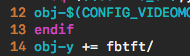
- 在video/Makefile最后添加了一行 obj-y += fbtft
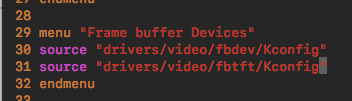
- 在video/Kconfig 中source “drivers/video/fbdev/Kconfig”行下添加一行:source “drivers/video/fbtft/Kconfig”


4 回到openwrt_widora根目录,运行make kernel_menuconfig,找
Device Drivers  --->
  Graphics support  --->
  [*] VGA Arbitration
          (16)  Maximum number of GPUs
               Direct Rendering Manager  --->
               Frame buffer Devices  --->
               -*- Backlight & LCD device support  --->
               Console display driver support  --->
           [*] Bootup logo  --->


Frame buffer Devices  --->
   <*> Support for small TFT LCD display modules  --->
     <*>   FB driver for the ILI9341 LCD Controller


Bootup logo
                       [*]   Standard black and white Linux logo (NEW)
                       [*]   Standard 16-color Linux logo (NEW)
                       [*]   Standard 224-color Linux logo (NEW)
配置完后,推出时保存配置。

5 修改DTS,这里对应NEO,我们修改Widora32M.dts,路径是:target/linux/ramips/dts/Widora32M.dts 从105行,spidev@1这一段整体换成:
                       ili9341@1 {
                               #address-cells = <1>;
                               #size-cells = <1>;
                               status = "okay";
                               compatible = "ilitek,ili9341";
                               reg = <1 0>;
                               spi-max-frequency = <32000000>;
                               txbuflen = <16>;
                               rotate = <0>;
                               bgr;
                               fps = <15>;
                               buswidth = <8>;
                               dc-gpios = <&gpio0 11 1>;
                       };
改好的DTS在此: widora32m.dts.zip
回到openwrt_widora根目录开始编译,make V=s
由于配置内核后,会和openwrt里个别选项冲突,例如有如下需要手动选择的情况,按照正常平台选择即可。

ips.1516416378.txt.gz · Last modified: (external edit)